

Which HP All-in-One Computer Should Your Office Buy in Kenya? Core i5 vs Core i7 vs Core Ultra
Choosing the right HP All-in-One computers in Kenya can help your business create a more organized, productive and professional workspace. But with options featuring Intel Core i5, Core i7, Core Ultra 5 and Core Ultra 7 processors, how do you know which configuration is worth buying?
The answer depends on the work you do, the number of applications you run, your preferred screen size and how much performance your team needs.Before choosing a computer, it is important to understand processor generations, RAM, storage and other specifications. Our guide on important specifications to check before buying a laptop in Kenya explains what buyers should consider.
An HP All-in-One combines the computer and display into one unit, reducing the need for a separate desktop tower. This makes it a practical option for reception desks, offices, schools, customer service counters and home workspace.
At FGEE Technology, you can explore HP All-in-One computers with different processor, memory, storage and display configurations. This guide compares the available options to help you choose the right computer for your needs.
What is an HP All-in-One computer?
An All-in-One (AIO) computer combines the main computer hardware and monitor into a single display unit.
Unlike a traditional desktop setup, which normally requires a separate system unit connected to a monitor, an All-in-One keeps the main components behind or within the display.
This design offers several advantages:
- Less desk clutter: Fewer separate components occupy your workspace.
- Professional appearance: A clean setup is suitable for reception areas, offices and customer-facing environments.
- Simpler installation: You need fewer separate components to set up the workstation.
- Large display: Screen sizes such as 24-inch and 27-inch provide room for documents, spreadsheets and business applications.
An All-in-One is particularly useful when you want a fixed workstation without the extra space required by a traditional desktop tower.
HP All-in-One Core i5 vs Core i7 vs Core Ultra: Which is better?
The processor is one of the most important considerations when buying an HP All-in-One. However, choosing a computer should not be based on the processor name alone. RAM, storage, processor generation and the actual processor model also matter.
Here is how the options compare.
| Configuration | Best suited for | What to consider |
|---|---|---|
| Core i5, 13th Gen | Everyday office and administrative work | Suitable for routine productivity when paired with adequate RAM |
| Core i7, 13th Gen | Heavier multitasking and demanding office workloads | A useful choice for users running several applications |
| Core Ultra 5 | Modern productivity workloads | Check the exact processor model and RAM configuration |
| Core Ultra 7 | Users seeking a higher-tier processor configuration | Confirm the exact processor model and complete specifications |
1. HP All-in-One Core i5: A practical option for everyday office work
If your business needs a computer for routine office operations, an HP All-in-One with a 13th-generation Intel Core i5 processor is worth considering.
Typical workloads include:
- Microsoft Word and Excel.
- Email and internet browsing.
- Business management applications.
- Customer records and data entry.
- Online meetings and communication.
- General administrative tasks.
FGEE has an HP All-in-One configuration featuring a 13th-generation Core i5 processor, 8GB RAM and a 512GB SSD.
This configuration is worth considering for reception desks, administrative departments and users whose daily work does not require particularly demanding applications.
2. HP All-in-One Core i7: For heavier multitasking
For professionals who regularly work with several applications, a Core i7 configuration may be a better fit.
Consider this option if your employees frequently switch between:
- Large Excel spreadsheets.
- Accounting and business management software.
- Multiple browser tabs.
- Documents and presentations.
- Video conferencing applications.
FGEE’s listed stock includes an HP All-in-One with a 13th-generation Core i7 processor, 16GB RAM and 512GB SSD.
The combination of 16GB RAM and SSD storage provides a useful configuration for multitasking and everyday business productivity.
For businesses upgrading several workstations, this is an option worth comparing against the Core i5 configuration.
3. HP All-in-One Core Ultra 5: A modern productivity option
Intel Core Ultra processors introduce a different processor family from the traditional Core i5 and Core i7 naming.
An HP All-in-One with Core Ultra 5 is worth considering if you want a newer processor platform for everyday productivity.
However, do not assume that every Core Ultra 5 configuration has identical capabilities. The exact processor model, generation, memory and other specifications should be checked before purchase.
FGEE has an HP All-in-One Core Ultra 5 configuration with 8GB RAM and 512GB SSD.
This is an option to consider for users who primarily perform office tasks, browsing, document preparation and routine business operations.
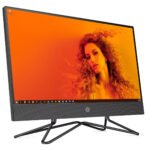
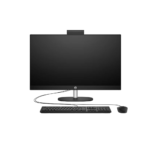
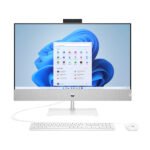
4. HP All-in-One Core Ultra 7: For users seeking a higher-tier configuration
If you want a higher-tier processor configuration, consider the HP All-in-One with Intel Core Ultra 7.
FGEE’s available configurations include:
- HP All-in-One Core Ultra 7 with 16GB RAM and 512GB SSD, 24-inch display.
- HP All-in-One Core Ultra 7 with 16GB RAM and 512GB SSD, 27-inch non-touch display.
These configurations are worth comparing for managers, professionals and business users who need a workstation for regular multitasking and productivity.
Before choosing, confirm the exact processor model and whether the computer meets the requirements of your applications.
24-inch vs 27-inch HP All-in-One: Which screen size should you choose?
Processor performance is important, but screen size also affects everyday productivity.
The right display depends on your available desk space and how you use your computer.
HP All-in-One 24-inch
A 24-inch display is a practical choice for:
- Reception and front-office workstations.
- Small and medium-sized offices.
- Administrative departments.
- Home offices.
- Workspace with limited desk space.
It provides a larger working area than many laptop screens without occupying as much space as a larger desktop display.
HP All-in-One 27-inch
A 27-inch display provides more screen space for users who regularly work with multiple windows, documents and spreadsheets.
It may be suitable for:
- Managers and business owners.
- Finance and accounting departments.
- Professionals working with large spreadsheets.
- Users who prefer a larger display.
- Offices where the workstation has enough desk space.
FGEE’s listed stock includes a 27-inch HP All-in-One Core Ultra 7 with 16GB RAM and 512GB SSD in a non-touch configuration.
Important: A larger display does not automatically mean faster performance. Compare the processor, RAM and storage separately when choosing your computer.
Which HP All-in-One should you buy? Compare the available FGEE configurations
Here is a comparison of the HP All-in-One configurations supplied by FGEE.
| HP All-in-One configuration | RAM | Storage | Display |
|---|---|---|---|
| Core i7, 13th Gen | 16GB | 512GB SSD | 24-inch |
| Core Ultra 7 | 16GB | 512GB SSD | 24-inch |
| Core Ultra 7 | 16GB | 512GB SSD | 27-inch non-touch |
| Core i5, 13th Gen | 8GB | 512GB SSD | Confirm with FGEE |
| Core Ultra 5 | 8GB | 512GB SSD | Confirm with FGEE |
Configurations are based on the product information supplied by FGEE. Confirm the exact model, screen size, processor model, touch capability, operating system, warranty and availability before ordering.
Our recommendations
- For everyday office work: Compare the Core i5 13th Gen and Core Ultra 5 configurations.
- For multitasking: Consider the Core i7 with 16GB RAM or the Core Ultra 7 with 16GB RAM.
- For a larger workspace: Consider the 27-inch Core Ultra 7 configuration.
- For a professional reception area: A 24-inch All-in-One can provide a neat and space-efficient workstation.
The best choice is the configuration that matches your workload without paying for performance your team will not use.
HP All-in-One vs traditional desktop: Which is better for an office?
Both options can support business operations, but they serve different workspace requirements.
| Feature | HP All-in-One | Traditional desktop |
|---|---|---|
| Design | Computer and display combined | Separate system unit and monitor |
| Desk space | Generally takes up less space | Requires space for separate components |
| Setup | Fewer separate components | More components to connect |
| Upgrades | Internal upgrade options depend on the model | Often offers more upgrade flexibility |
| Office appearance | Clean, integrated workstation | More conventional desktop setup |
If portability is more important than having a fixed workstation, compare Dell vs HP business laptops before deciding which computer category suits your business.
Businesses working with tighter budgets can also explore refurbished laptops worth buying in Kenya as an alternative to purchasing new desktop computers.
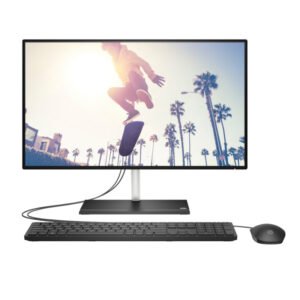
Choose an HP All-in-One if you value a compact workstation and a clean office layout.
A traditional desktop may be more suitable if your organization needs extensive hardware upgrades, specialized components or greater flexibility when replacing individual parts.
Where can you buy HP All-in-One computers in Kenya?
If you are comparing HP All-in-One computers in Kenya for your office, FGEE Technology offers computing products and business technology solutions.
You can explore the available configurations and compare processor options, RAM, SSD storage and display sizes before making your decision.
Browse the HP and All-in-One desktop category at FGEE to explore available products.
You can also contact FGEE for assistance choosing a configuration that matches your business requirements.
FGEE Technology
- Phone: 0719 150 150
- Email: info@fgee.co.ke
- Location: Kimathi House and Revlon Plaza, Kimathi Street, Nairobi CBD.
- Website: www.fgee.co.ke
For employees who work remotely or move between different locations, our guide to the best remote work laptops in Kenya provides additional options.
Whether you are setting up a new office, replacing aging computers or upgrading your team’s workstations, FGEE can help you compare available HP All-in-One options.
Frequently Asked Questions About HP All-in-One Computers
1. Which HP All-in-One computer is best for office work?
The best option depends on your workload. A Core i5 configuration can suit everyday office tasks, while Core i7 and Core Ultra 7 configurations with 16GB RAM are worth considering for heavier multitasking.
2. Is an HP All-in-One better than a normal desktop?
An HP All-in-One is useful when you want a compact workstation with fewer separate components. A traditional desktop may be better if you need more hardware upgrade flexibility.
3. Is 8GB RAM enough for an office computer?
8GB RAM can support basic office tasks such as document editing, email and browsing. However, 16GB RAM is a more comfortable option for users who regularly run several applications simultaneously.
4. Should I buy a 24-inch or 27-inch HP All-in-One?
A 24-inch model is suitable for many standard office workstations. A 27-inch display offers more screen space for spreadsheets, documents and multitasking, provided you have enough desk space.
5. What is the difference between Intel Core i7 and Intel Core Ultra 7?
They belong to different Intel processor naming families. Their performance depends on the exact processor model and generation, so compare the full specifications rather than relying on the name alone.
6. Where can I buy HP All-in-One computers in Nairobi?
You can explore HP All-in-One desktops through FGEE Technology. Visit its All-in-One desktop category or contact the team on 0719 150 150 to confirm available configurations.
Upgrade Your Office Workstation with FGEE Technology
The right office computer should support your team’s daily workload, provide enough memory and storage, and fit your working environment.
Whether you need a 24-inch workstation for administrative duties, a Core i7 configuration for multitasking or a 27-inch Core Ultra 7 computer for a larger display, compare the available HP All-in-One options before making your decision.
Explore HP All-in-One computers at FGEE Technology and contact the team for current stock and pricing.
Comments (0)