
Lenovo Laptops in Kenya: ThinkBook 14 G9 Ultra 7 vs IdeaPad Slim 3 Core i7
Choosing the right laptop can make a difference in how you work, study and manage everyday tasks. If you are searching for Lenovo laptops in Kenya, two options worth considering are the Lenovo ThinkBook 14 G9 with an Intel Core Ultra 7 processor and the Lenovo IdeaPad Slim 3 with a 13th-generation Intel Core i7 processor. Both are listed with 16GB RAM and a 512GB SSD in the configurations being considered.
While both laptops offer memory and storage suited to everyday productivity, they target slightly different buyer preferences. Understanding their specifications and intended uses can help you choose a laptop that meets your needs.
Which Lenovo Laptop Should You Choose?
The Lenovo ThinkBook series is designed with professional and business use in mind, while the IdeaPad Slim 3 is a practical option for students, office users and people looking for a laptop for everyday computing.
Your ideal choice depends on your workload, preferred features and budget.
- Choose the Lenovo ThinkBook 14 G9 Ultra 7 if you want a business-oriented laptop and the particular configuration meets your professional requirements.
- Consider the Lenovo IdeaPad Slim 3 Core i7 13th Gen if you need a laptop for studies, office applications, web browsing, research and everyday multitasking.
Always verify the exact processor, display, operating system and other specifications of the unit before purchasing.
1. Lenovo ThinkBook 14 G9 Ultra 7, 16GB RAM and 512GB SSD
The Lenovo ThinkBook 14 G9 is worth considering for professionals, entrepreneurs and office users who need a laptop for regular work and productivity.
The ThinkBook range focuses on professional use, making it relevant to people who work with documents, spreadsheets, presentations, online meetings and multiple business applications.
Key specifications
- Processor: Intel Core Ultra 7, subject to confirmation of the exact model
- Memory: 16GB RAM
- Storage: 512GB SSD
- Product range: Lenovo ThinkBook 14 Gen 9
- Intended use: Business productivity, office work, research and multitasking
Who is the ThinkBook 14 G9 suitable for?
Business professionals: Manage documents, spreadsheets, presentations and other everyday business tasks.
Entrepreneurs: Use business applications, communicate with clients and organise day-to-day operations.
Remote and office workers: Work with browser-based platforms, video meetings and productivity software, depending on the applications required.
For more options suited to working from home or on the move, see our guide to the best remote work laptops in Kenya
Developers and technical users: Run code editors, browsers and development tools, provided the laptop meets the requirements of the specific software and projects.
If you’re comparing laptops for professional use, explore our guide to the best business laptops in Kenya for more options to consider.
If you need a professional laptop, compare the ThinkBook’s exact configuration, ports, display and upgrade options before making your decision.
Explore the Lenovo ThinkBook 14 G9 Core 7 240H, 16GB RAM and 512GB SSD on FGEE. Confirm with FGEE whether this listing is the same configuration as the Core Ultra 7 model you want.
2. Lenovo IdeaPad Slim 3 Core i7 13th Gen, 16GB RAM and 512GB SSD
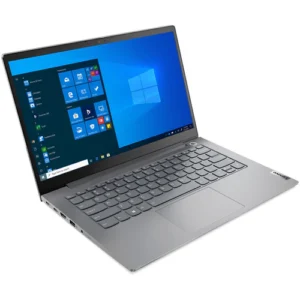
The Lenovo IdeaPad Slim 3 is an option for buyers looking for a laptop for study, office productivity and everyday computing.
The particular FGEE listing identifies the IdeaPad Slim 3 14IRH8 with an Intel Core i7-13620H processor, 16GB DDR5 RAM and a 512GB SSD. These specifications provide a useful starting point when comparing laptops for work and study.
Key specifications
- Processor: Intel Core i7-13620H, 13th generation
- Memory: 16GB DDR5 RAM
- Storage: 512GB M.2 PCIe NVMe SSD
- Display: 14-inch Full HD IPS, anti-glare
- Graphics: Integrated Intel UHD Graphics
- Intended use: Study, office work, research, browsing and everyday productivity
Specifications and operating-system availability should be checked against the exact unit being offered.
Who is the IdeaPad Slim 3 suitable for?
University and college students: Handle research, assignments, presentations and online learning.
Office workers: Work with word-processing applications, spreadsheets, email and web-based business tools.
Freelancers: Manage browser-based applications, documents, communication and other everyday professional tasks.
Everyday users: Browse the internet, stream content, organise files and perform routine computing tasks.
The 16GB RAM configuration can support multitasking, while the 512GB SSD provides space for applications, documents and other files. Actual performance and available storage depend on the software installed and the user’s workload.
View the Lenovo IdeaPad Slim 3 Core i7 13th Gen, 16GB RAM and 512GB SSD on FGEE.
ThinkBook 14 G9 vs IdeaPad Slim 3: What Is the Difference?
Both laptop families can serve everyday productivity needs, but the best option depends on the exact hardware configuration and how you intend to use the laptop.
| Feature | ThinkBook 14 G9 Ultra 7 | IdeaPad Slim 3 Core i7 |
|---|---|---|
| Processor | Core Ultra 7; exact model to confirm | Core i7-13620H, 13th Gen |
| RAM | 16GB | 16GB DDR5 |
| Storage | 512GB SSD | 512GB SSD |
| Product positioning | Business-oriented | Everyday and student productivity |
| Consider it for | Professional and business workflows | Study, office work and daily computing |
Which is better for business? The ThinkBook is worth evaluating for professional use, especially if its specific configuration offers the features you need.
Which is better for students? The IdeaPad Slim 3 is a practical candidate for coursework, research and office applications.
Which is faster? The processor names alone are not enough to establish an overall winner. The exact ThinkBook processor, cooling design, power settings and workload all matter.
Which is more affordable? Compare the current selling prices, warranty terms and included software before deciding.
What Do 16GB RAM and a 512GB SSD Mean for Everyday Use?
When comparing Lenovo laptops in Kenya, it helps to understand the specifications beyond the processor name. Before choosing between these models, review our guide to things to check before buying a laptop in Kenya to understand which specifications matter most for your needs
16GB RAM for multitasking
RAM is the temporary memory a laptop uses to run active applications. A 16GB configuration can be useful when switching between browser tabs, office applications, video meetings and other everyday programs.
Your actual experience depends on the applications you use and their memory requirements.
512GB SSD for storage
An SSD stores your operating system, applications and personal files. Compared with a traditional mechanical hard drive, an SSD generally offers faster file access and system responsiveness.
A 512GB SSD can provide useful space for documents, software, study materials and work files. The amount available for personal use will be lower than the advertised capacity after the operating system and applications occupy space.
To understand the difference between storage technologies, read our guide to SSD vs HDD and how they affect laptop storage and responsiveness
Choosing the right processor
The Intel Core i7-13620H and Intel Core Ultra 7 belong to different processor families. The Core Ultra 7 designation alone does not establish how much faster a laptop will be than a particular Core i7 model.
Consider the specific processor model alongside your workload, battery requirements and software compatibility.
Where Can You Buy Lenovo Laptops in Kenya?
When shopping for a Lenovo laptop in Kenya, compare the exact model specifications, price, warranty and operating-system configuration before placing an order.
FGEE lists Lenovo laptops for customers comparing options for professional work, study and everyday productivity. You can review the product details for both models directly on the FGEE website:
Before purchasing, confirm the current price, stock availability, warranty, processor model and whether Windows is included.
Frequently Asked Questions About Lenovo Laptops
Is a Lenovo laptop with 16GB RAM good for work?
A Lenovo laptop with 16GB RAM can be suitable for many office applications, web browsing, online meetings, research and everyday multitasking. Users working with demanding professional software should also check processor, graphics and application requirements.
Is the Lenovo IdeaPad Slim 3 Core i7 suitable for university students?
Yes. The specified IdeaPad Slim 3 configuration can suit many university tasks, including research, assignments, presentations and online learning. Students should check the requirements of their courses, particularly for engineering, design or other specialist software.
What is the difference between Lenovo ThinkBook and IdeaPad?
ThinkBook models are positioned toward business and professional users, while IdeaPad models cover a broad range of everyday computing and consumer needs. The actual differences depend on the specific models and configurations being compared.
Is 512GB SSD enough for a laptop?
A 512GB SSD is sufficient for many users who store documents, applications, coursework and everyday files. Users working with large video projects, extensive datasets or large game libraries may need additional storage.
Should I choose Intel Core Ultra 7 or Intel Core i7?
Neither label guarantees that a laptop will be better in every situation. Compare the full processor model, memory, cooling, battery, display and intended workload. Also verify the exact ThinkBook configuration before comparing it with the IdeaPad Slim 3.
Where can I check the prices of these Lenovo laptops in Kenya?
You can check the individual product pages on FGEE’s website for the listed prices and product details. Confirm current stock, warranty and the exact specifications with the seller before purchasing.
Find the Lenovo Laptop That Fits Your Needs
Whether you need a laptop for business, office productivity, university or everyday computing, the Lenovo ThinkBook 14 G9 and IdeaPad Slim 3 are two options worth comparing.
The ThinkBook is worth evaluating for professional workflows, while the IdeaPad Slim 3 offers a configuration suited to many common study and office tasks. Compare the complete specifications, current prices and warranty terms to determine which laptop fits your needs.
Visit FGEE’s product pages to explore the ThinkBook 14 G9 and IdeaPad Slim 3 and confirm the available configurations before ordering.

Comments (0)