

How to Choose a Printer for Cyber Cafe in Kenya
Running a cyber cafe in Kenya means dealing with customers who need documents printed, copied, scanned, and sometimes processed in large volumes. Choosing the right printer for cyber cafe in Kenya can therefore have a direct impact on your printing speed, operating costs, customer waiting time, and overall profitability.
So, how do you choose the right printer for cyber cafe?
The key is to look beyond the purchase price. A suitable cyber cafe printer should handle your expected workload, provide reasonable printing costs, offer the features your customers need, and have readily available ink, toner, and spare parts.
This guide explains the main factors to consider when choosing a printer for cyber cafe in Kenya.
What Type of Printer Is Best for a Cyber Cafe?
There is no single printer that is suitable for every cyber cafe. The right choice depends on your daily printing volume, colour requirements, services offered, and budget.
Generally, cyber cafes should consider:
- Ink tank printers
- Monochrome laser printers
- Colour laser printers
- Multifunction printers
An ink tank printer can be useful for affordable colour printing, while a laser printer can be suitable for businesses handling large volumes of text documents. A multifunction printer can combine printing, scanning, and copying in one machine.
FGEE’s guide on Ink Tank vs Laser Printers in Kenya: Which Should You Buy? provides a more detailed comparison of the two technologies.
1. Estimate How Much Your Cyber Cafe Prints
Before buying a printer, estimate how many pages your cyber cafe prints every day and every month.
Think about the services you provide, including:
- Printing documents
- Printing CVs
- Printing application forms
- Printing assignments
- Printing school notes
- Printing certificates
- Printing government documents
- Printing colour documents
- Photocopying
- Scanning
A cyber cafe that prints a few hundred pages per month has different requirements from one handling thousands of pages.
Why printing volume matters
Your printing volume affects:
- Printer durability
- Ink or toner consumption
- Maintenance frequency
- Printing speed
- Paper requirements
- Long-term operating costs
Choosing a printer that is too small for your workload can result in frequent interruptions, slow service, and increased maintenance.
2. Consider Printing Cost Per Page
For a cyber cafe, the cost of printing each page is one of the most important factors to consider.
Your printer may be used hundreds or thousands of times, so even a small difference in cost per page can become significant over time.
Before purchasing, compare:
- Ink or toner price
- Estimated page yield
- Cost of replacement cartridges
- Cost of refill ink
- Availability of consumables
- Black-and-white printing costs
- Colour printing costs
Do not look only at the price of the printer itself.
A printer with a lower purchase price may become more expensive to operate if it requires frequent and costly cartridge replacements.
3. Choose Between Ink Tank and Laser
One of the biggest decisions when buying a cyber cafe printer is whether to choose an ink tank or laser printer.
Ink Tank Printers
Ink tank printers use refillable ink reservoirs and can be suitable for businesses that regularly print colour documents.
They can be useful in cyber cafes that serve customers who need:
- Colour CVs
- School assignments
- Posters
- Forms
- Graphics
- Certificates
- Marketing documents
For example, FGEE currently lists the Epson EcoTank L3350, an all-in-one printer with print, scan and copy functions, Wi-Fi connectivity and refillable EcoTank ink tanks.
Laser Printers
Laser printers use toner and are commonly used for fast document printing.
They can be suitable for cyber cafes that handle a high volume of:
- Black-and-white documents
- Contracts
- Applications
- Reports
- Forms
- School documents
- Business documents
The important thing is to match the technology to your actual workload rather than assuming one type is always better.
4. Look at Print Speed
Customers visiting a cyber cafe generally want their documents processed quickly.
Print speed is usually measured in pages per minute (PPM) or images per minute (IPM), depending on the printer.
If your cyber cafe regularly has several customers waiting to print documents, a slow printer can create queues and reduce the number of customers you can serve.
When comparing printers, consider:
- Black-and-white print speed
- Colour print speed
- First-page-out time
- Duplex printing speed
- Print resolution
For high-volume environments, print speed should be considered alongside reliability and running costs.
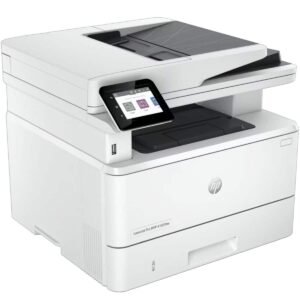
5. Consider a Multifunction Printer
A multifunction printer can be particularly useful for cyber cafes because customers often need more than printing.
A multifunction printer can combine:
- Printing
- Scanning
- Copying
- Faxing on selected models
This allows a cyber cafe to provide several services using one machine.
For example, FGEE’s current printer range includes multifunction models from HP, Epson, Kyocera and other brands.
You can also read FGEE’s detailed guide to multifunctional printers in Kenya to compare the features available on different types of multifunction printers.
6. Check Whether You Need Colour Printing
Colour printing can be an important source of revenue for a cyber cafe.
Customers may need colour printing for:
- CVs
- Certificates
- School assignments
- Posters
- Brochures
- Presentations
- Business documents
- Photos
- Application documents
However, colour printing can also have higher operating costs than black-and-white printing.
If your cyber cafe provides both services, consider having equipment that allows you to handle both colour and monochrome workloads efficiently.
7. Check Duplex Printing
Duplex printing means printing on both sides of a sheet of paper.
This feature can be useful when customers print long documents, reports, assignments, manuals, and other multi-page files.
Automatic duplex printing can:
- Reduce paper consumption
- Make long documents easier to manage
- Reduce manual paper handling
- Improve productivity
If your cyber cafe handles many multi-page documents, automatic duplex printing is a feature worth considering.
8. Consider Scanning and Copying
Printing is only one part of the services offered by many cyber cafes.
Customers may also need to:
- Scan identification documents
- Scan certificates
- Copy application forms
- Scan academic documents
- Photocopy contracts
- Digitise paperwork
A multifunction printer with scanning and copying capabilities can help you offer these services without purchasing separate equipment.
If scanning is an important part of your business, consider whether the printer has an Automatic Document Feeder (ADF). An ADF allows multiple pages to be processed without placing every page manually on the scanner.
9. Check Paper Capacity
Paper capacity becomes important when your cyber cafe handles many customers.
A printer with a small paper tray may require frequent refilling during busy periods.
Before buying, check:
- Standard paper tray capacity
- Additional tray options
- Supported paper sizes
- Manual feed capability
- A4 support
- A3 support if required
Most cyber cafes will regularly use A4 paper, but your requirements may differ depending on the services you provide.
10. Check Connectivity
A cyber cafe may have several computers connected to the same printer.
For this reason, check whether the printer supports the connection method that suits your setup.
Common options include:
- USB
- Ethernet
- Wi-Fi
- Wi-Fi Direct
- Mobile printing
Network connectivity can make it easier for multiple computers to send print jobs to the same printer.
However, the best connection depends on your cyber cafe’s network setup and the number of devices using the printer.
11. Consider Printer Durability
Cyber cafe printers can experience significantly more use than printers in a typical home environment.
Before purchasing, check the printer’s recommended workload and specifications.
You should consider:
- Monthly duty cycle
- Recommended monthly volume
- Printer construction
- Paper handling capacity
- Availability of replacement parts
- Manufacturer support
Do not choose a printer simply because it has an attractive price. Make sure it is designed to handle the amount of work you expect it to perform.
12. Check Ink, Toner and Spare Part Availability in Kenya
A printer is only useful when you can keep it running.
Before buying, check whether you can easily find its:
- Ink
- Toner
- Print heads
- Maintenance kits
- Rollers
- Replacement parts
This is especially important for a cyber cafe because printer downtime can mean lost revenue.
FGEE’s current printer catalogue includes printers and consumables from brands such as HP, Epson, Brother, Canon and Kyocera, giving buyers several options when comparing equipment and ongoing supplies.
13. Think About Maintenance
Regular printer maintenance can help reduce problems such as paper jams, poor print quality and unexpected downtime.
A cyber cafe should establish simple maintenance practices such as:
- Keeping the printer clean
- Using suitable paper
- Avoiding overloaded paper trays
- Replacing consumables when required
- Checking for paper debris
- Following manufacturer maintenance instructions
- Scheduling professional servicing when necessary
For more practical advice, read FGEE’s guide on How to Maintain Your Printer for Long-Term Use.
14. Calculate the Total Cost of Ownership
The cost of a cyber cafe printer does not end when you purchase it.
Your long-term costs may include:
- Printer purchase price
- Ink or toner
- Paper
- Maintenance
- Repairs
- Replacement parts
- Electricity
- Downtime
This is known as the total cost of ownership.
For a cyber cafe, this is particularly important because the printer is a revenue-generating business asset.
A printer that costs slightly more initially may potentially be more economical over time if it has suitable running costs, good reliability, and readily available consumables.
15. Consider the Services Your Cyber Cafe Offers
Your choice should also depend on the services you want to provide.
For example:
| Cyber cafe service | Useful printer feature |
|---|---|
| Black-and-white documents | Fast monochrome printing |
| Colour documents | Colour ink tank or laser |
| CV printing | Good text and colour quality |
| School assignments | Affordable page costs |
| Photocopying | Multifunction printer |
| Document scanning | Scanner with suitable resolution |
| Multi-page documents | ADF and duplex printing |
| High-volume printing | Higher-duty printer |
| Multiple computers | Network connectivity |
This approach helps you choose equipment based on your business model instead of simply buying the cheapest available printer.
How Much Should You Spend on a Cyber Cafe Printer?
There is no single budget that works for every cyber cafe.
The amount you should spend depends on:
- Expected printing volume
- Services offered
- Colour requirements
- Required print speed
- Scanning and copying requirements
- Available space
- Cost of consumables
- Expected lifespan
For example, FGEE’s current catalogue includes entry-level ink tank printers as well as higher-capacity multifunction laser machines, allowing businesses to compare different levels of printing equipment.
Rather than setting a budget based only on the purchase price, calculate how much the printer will cost to operate over the period you expect to use it.
How Can a Cyber Cafe Reduce Printing Costs?
Buying the right printer is only the first step.
You can reduce printing expenses by:
- Using duplex printing where appropriate
- Avoiding unnecessary colour printing
- Comparing ink and toner yields
- Using suitable print-quality settings
- Maintaining the printer regularly
- Monitoring paper consumption
- Preventing unnecessary reprints
- Choosing printers with manageable consumable costs
For more ideas, read How to Reduce Printing Costs for Your Business.
Common Mistakes Cyber Cafes Should Avoid
Buying Based Only on the Purchase Price
A low-cost printer may have higher operating costs.
Ignoring Print Volume
A printer designed for occasional use may not be suitable for heavy cyber cafe workloads.
Choosing the Wrong Printing Technology
Think about whether your customers mainly need colour, black-and-white, or both.
Forgetting About Consumables
Always check the cost and availability of ink and toner before purchasing.
Ignoring Maintenance
Poor maintenance can result in unnecessary downtime and repair costs.
Buying a Printer Without Considering Future Growth
If you expect your cyber cafe to grow, consider whether the printer can handle increased demand.
Which Printer Features Matter Most for a Cyber Cafe?
If you are comparing several printers, pay particular attention to:
- Print speed – important when customers are waiting.
- Cost per page – affects your profit margins.
- Print volume – determines whether the machine can handle your workload.
- Colour capability – important if you offer colour printing.
- Duplex printing – helps reduce paper consumption.
- Scanning and copying – allows you to offer additional services.
- ADF – useful for processing multiple pages.
- Network connectivity – useful when several computers share the printer.
- Consumable availability – helps reduce downtime.
- Maintenance and support – important for long-term reliability.
Where Can You Buy a Printer for Cyber Cafe in Kenya?
FGEE Technology offers a range of printers for different business requirements, including HP, Epson, Brother, Canon, Kyocera and Toshiba models. Its catalogue includes ink tank printers, laser printers, multifunction printers, scanners and printer consumables.
You can browse FGEE’s printers and compare models based on your cyber cafe’s printing volume, colour requirements, speed and budget.
FGEE also provides delivery across Kenya and offers technical support for its products.
Frequently Asked Questions On Printer For Cyber Cafe In Kenya
What type of printer is suitable for cyber cafe in Kenya?
A suitable printer depends on the cyber cafe’s workload and services. Ink tank printers can be useful for affordable colour printing, while laser printers can be suitable for fast, high-volume document printing. A multifunction printer can be useful when the cyber cafe also provides scanning and photocopying.
Is an ink tank printer good for a cyber cafe?
An ink tank printer can be suitable for a cyber cafe that handles regular colour printing and wants refillable ink tanks. Before purchasing, compare its print speed, recommended workload, ink costs and maintenance requirements.
Is a laser printer better for a cyber cafe?
A laser printer can be suitable for cyber cafes that handle high volumes of text-heavy documents and require fast printing. However, the right choice depends on the type of documents customers print and the cost of consumables.
Should a cyber cafe buy a multifunction printer?
A multifunction printer can be useful because it combines printing, scanning and copying. This allows a cyber cafe to provide multiple services using one machine.
How can a cyber cafe reduce printing costs?
A cyber cafe can reduce printing costs by choosing a printer with suitable consumable costs, using duplex printing, reducing unnecessary colour printing, maintaining the equipment, and monitoring paper, ink and toner consumption.
What should I check before buying a cyber cafe printer?
Check the printer’s print speed, recommended monthly workload, cost per page, ink or toner availability, colour capabilities, paper capacity, duplex printing, scanning and copying functions, connectivity, maintenance requirements and warranty.
Conclusion On Printer For Cyber Cafe In Kenya
Choosing a printer for cyber cafe in Kenya requires more than comparing purchase prices. The right printer should match your daily printing volume, customer requirements, print speed, colour needs, running costs and available services.
Before buying, calculate your expected print volume and compare the cost of ink or toner, paper, maintenance and repairs. If your cyber cafe offers scanning and photocopying, consider a multifunction printer. If customers frequently print large documents, look for suitable print speeds, paper capacity and duplex printing.
Most importantly, choose a printer that can handle your current workload while leaving room for your business to grow.
For cyber cafes looking for printing equipment in Kenya, FGEE Technology’s printer range provides multiple options across ink tank, laser and multifunction categories.
Comments (0)