

A3 vs A4 Printers in Kenya: Which Printer Should Your Business Buy?
Choosing between an A3 vs A4 printers in Kenya is an important decision for businesses that depend on printing, copying and scanning documents. The right printer can improve office productivity, simplify document management and reduce unnecessary printing expenses.
But does your business really need an A3 multi function printer, or would an A4 office printer handle your daily workload?
The answer depends on the documents you produce, your printing volume, whether you need color printing and the additional functions required by your employees.
For businesses comparing professional printing equipment, FGEE Technology offers office printer options from established manufacturers, including Kyocera and HP.
If you are still evaluating which type of office equipment suits your organisation, read our guide on how to choose the right office printer before making a purchase.
This guide explains the differences between A3 and A4 printers and compares selected Kyocera ECOSYS and HP Color LaserJet Pro models to help you make an informed buying decision.
What is the difference between A3 vs A4 printers?
The main difference between A3 vs A4 printers in Kenya is the maximum paper size they support.
An A4 sheet measures 210 × 297 mm, while an A3 sheet measures 297 × 420 mm. A3 paper is twice the area of A4 paper.
This difference affects the type of documents a printer can produce.
A4 printers
A4 printers are designed around everyday office documents, including:
- Business letters and correspondence.
- Invoices and receipts.
- Reports and proposals.
- Contracts and application forms.
- General office documents.
- Marketing materials within supported paper sizes.
They are suitable for businesses that primarily print standard documents and do not regularly require larger-format output.
A3 printers
A3 printers support larger documents and can also handle standard A4 printing.
They are particularly useful for organizations that produce:
- Architectural and engineering drawings.
- Business charts and large spreadsheets.
- Posters and promotional materials.
- Large reports and presentations.
- Technical documents and diagrams.
- Larger-format office copies.
An A3 multi function printer can be a practical investment for businesses that regularly work with documents that cannot comfortably fit on A4 paper.
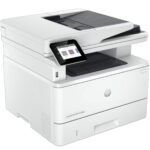
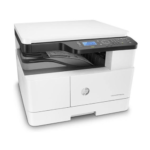
A3 vs A4 printers: Which one should your business choose?
The best printer depends on how your organization uses printed documents.
| Business requirement | A3 printer | A4 printer |
|---|---|---|
| Standard office documents | Yes | Yes |
| Larger reports and diagrams | Yes | Limited by supported paper size |
| Large-format spreadsheets | Better suited | May require scaling |
| Architectural drawings | Better suited | Not suitable for full-size A3 output |
| Everyday invoices and letters | Yes | Yes |
| Office space | Generally larger | Generally more compact |
| Large-format copying | Supported on suitable models | Not supported |
Choose an A3 printer if:
Your business regularly prints larger documents, technical drawings, charts or promotional materials.
It can also be a good choice for organizations that need one multi function machine to handle both A3 and A4 printing, copying and scanning.
Choose an A4 printer if:
Your employees mainly print letters, invoices, reports, contracts and standard business documents.
An A4 machine can meet these requirements without requiring the larger paper-handling capacity of an A3 multi function printer.
Buying tip: Do not purchase an A3 printer simply because it supports larger paper. If your organization almost exclusively prints A4 documents, an A4 office printer may be the more practical choice.
Best Kyocera A3 printers for business use in Kenya
Kyocera ECOSYS multi function printers are designed for office environments that require printing, copying and scanning.
Two models worth comparing from FGEE’s product range are the Kyocera ECOSYS M8124cidn and M4125idn.
1. Kyocera ECOSYS M8124cidn: A3 color multi function printer
The Kyocera ECOSYS M8124cidn is an A3/A4 color multi function laser printer.
It is suitable for organizations that need color printing alongside larger-format document handling.
Key specifications include:
- Color laser printing.
- Print, scan and copy functionality.
- A3 and A4 paper support.
- Up to 24 pages per minute for A4 color and monochrome printing.
- Up to 1,200 × 1,200 dpi print resolution.
- Automatic duplex printing.
- 50-sheet reverse automatic document feeder.
- Network and USB connectivity.
- AirPrint and Mopria mobile printing support.
Who should buy it?
This model is worth considering for:
- Marketing and communications departments.
- Corporate offices.
- Schools and educational institutions.
- Organizations producing color reports and presentations.
- Businesses that need larger-format color documents.
Its color capability makes it particularly useful where documents need color charts, graphics and other visual elements.
Explore the Kyocera ECOSYS M8124cidn A3/A4 color multi function printer at FGEE.
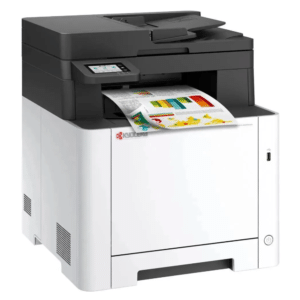
2. Kyocera ECOSYS M4125idn: A3 monochrome multi function printer
If your business mainly prints black-and-white documents but still needs A3 paper support, consider the Kyocera ECOSYS M4125idn.
This monochrome multi function laser printer combines printing, scanning and copying.
Key specifications include:
- A3 and A4 paper support.
- Monochrome laser printing.
- Print, scan and copy functionality.
- Up to 25 pages per minute for A4 monochrome printing.
- Up to 1,200 × 1,200 dpi print resolution.
- Automatic double-sided printing.
- 50-sheet reverse automatic document feeder.
- USB and network connectivity.
- 4.3-inch color touchscreen.
Who should buy it?
The M4125idn is worth considering for:
- Accounting departments.
- Schools and training institutions.
- Government and administrative offices.
- Businesses that produce large volumes of black-and-white documents.
- Organizations that need A3 copying and scanning without color printing.
If your office rarely needs color output but regularly handles larger documents, this model deserves consideration.
Explore the Kyocera ECOSYS M4125idn A3/A4 monochrome printer at FGEE.
Best HP office printers for everyday business printing
Not every business needs A3 paper support. Many offices primarily print standard documents and need a reliable color laser printer with network connectivity and multi function capabilities.
The HP Color LaserJet Pro MFP 4303 series offers configurations designed around these requirements.
The three models supplied in FGEE’s product list are the HP M4303fdw, M4303fdn and M4303dw.
These are A4-class office printers rather than A3 multi function machines.
3. HP Color LaserJet Pro MFP M4303fdw
The HP M4303fdw is a color laser multi function printer offering printing, copying, scanning and faxing.
Its features include:
- Color laser printing.
- Print, copy, scan and fax.
- A4 printing speeds of up to 33 pages per minute in black and color.
- Automatic duplex printing.
- Wi-Fi and Ethernet connectivity.
- 50-sheet automatic document feeder.
- Mobile printing support.
- Color touchscreen.
Who should buy it?
The M4303fdw is worth considering for businesses that need a network-connected color multi function printer with wireless connectivity and fax functionality.
4. HP Color LaserJet Pro MFP M4303fdn
The M4303fdn is another color multi function printer in the HP 4303 series.
It offers printing, copying, scanning and faxing, with wired Ethernet connectivity.
It is worth comparing if your organization prefers a wired office network and does not require built-in Wi-Fi.
5. HP Color LaserJet Pro MFP M4303dw
The M4303dw is a color laser multi function printer offering print, copy and scan functionality.
Unlike the fdw and fdn configurations, it does not include fax functionality.
It offers built-in wireless connectivity and is worth considering for offices that need color printing, copying and scanning without requiring a fax facility.
Important: The M4303dw, M4303fdn and M4303fdw have different feature combinations. Confirm the exact model before ordering rather than assuming that all three have identical functions.
HP M4303fdw vs M4303fdn vs M4303dw: Which should you choose?
| Feature | M4303dw | M4303fdn | M4303fdw |
|---|---|---|---|
| Color printing | Yes | Yes | Yes |
| Copying | Yes | Yes | Yes |
| Scanning | Yes | Yes | Yes |
| Fax | No | Yes | Yes |
| Built-in Wi-Fi | Yes | No | Yes |
| Ethernet | Yes | Yes | Yes |
| Automatic duplex printing | Yes | Yes | Yes |
The HP M4303dw is suitable if you need wireless printing and do not require fax.
The M4303fdn is worth considering for wired office networks where fax functionality is required.
The M4303fdw is the option to compare if you need both wireless connectivity and fax functionality.
For more information about the differences between these printer brands, read FGEE’s guide to the best business printers in Kenya: Kyocera vs HP.
A3 multi function printer vs A4 color laser printer: Which is better for your office?
The Kyocera ECOSYS M8124cidn, M4125idn and HP M4303 series serve different printing requirements.
The Kyocera models are designed for organizations that need A3 paper handling, while the HP M4303 series is suited to A4 office printing.
| Requirement | Kyocera M8124cidn | Kyocera M4125idn | HP M4303 series |
|---|---|---|---|
| Paper size | A3 and A4 | A3 and A4 | A4-class |
| Color printing | Yes | No | Yes |
| Print technology | Color laser | Monochrome laser | Color laser |
| Printing | Yes | Yes | Yes |
| Copying | Yes | Yes | Yes |
| Scanning | Yes | Yes | Yes |
| Fax | Optional | Optional | Depends on model |
| Best suited for | A3 color documents | A3 monochrome documents | Standard color office documents |
Which printer is best for a small business?
A small business that mainly prints invoices, letters, contracts and reports may find an A4 printer more practical.
The HP M4303dw is worth considering if wireless printing is important, while the M4303fdw adds fax functionality.
However, a business that regularly prints large spreadsheets, technical documents or A3 marketing materials should consider an A3-capable machine.
Which printer is best for a school?
Schools and training institutions may benefit from an A3 multi function printer when producing large charts, learning materials and administrative documents.
The Kyocera M8124cidn is worth considering when color printing is important, while the M4125idn may suit schools that primarily need monochrome printing and copying.
Which printer is best for a cyber cafe or printing bureau?
Cyber cafes and printing bureaus need to consider more than paper size. Their equipment must support the volume of customer printing, copying and scanning while keeping running costs manageable.
A business that mainly handles customer documents, applications, CVs and photocopies may find an A4 printer sufficient. However, printing bureaus that regularly handle large reports, posters, charts or technical documents may benefit from A3 equipment.
Read FGEE’s guide on how to choose a printer for a cyber cafe in Kenya for more advice on selecting equipment for customer-facing printing businesses.
Which printer is best for an accounting department?
Accounting departments usually print invoices, financial reports, statements and other business documents.
An A4 color multi function printer may be sufficient for routine paperwork. However, departments that frequently produce large spreadsheets and A3 reports may benefit from an A3 printer.
What should you check before buying an office printer in Kenya?
Before purchasing a printer, compare more than its advertised printing speed.
Here are important factors to consider.
1. Paper size requirements
Determine whether your business needs A3 printing or whether A4 paper is sufficient.
This is one of the most important decisions because it affects which printer models are suitable.
2. Color or monochrome printing
If your office produces marketing materials, color reports and presentations, a color printer may be necessary.
For businesses that mainly print text documents, a monochrome printer may be more appropriate.
It is also worth comparing ink tank vs laser printers in Kenya to understand the differences in printing technology, consumables and suitable workloads before deciding which type of machine to buy.
3. Printing speed
Printing speed is measured in pages per minute (ppm).
A busy office with multiple employees sharing a printer should consider the expected monthly workload and the printer’s recommended monthly page volume.
4. Automatic duplex printing
Automatic duplex printing allows the printer to print on both sides of a sheet without requiring users to turn the paper manually.
This can help reduce paper consumption and make document production more convenient.
5. Scanning and copying requirements
A multi function printer can reduce the need for separate office equipment.
Check whether the machine supports the scanning functions your organization requires, including automatic document feeding and two-sided scanning.
6. Connectivity
Consider whether your office requires:
- USB connectivity.
- Ethernet networking.
- Built-in Wi-Fi.
- Wireless mobile printing.
- Shared printing across departments.
Choose a configuration that works with your existing office network.
7. Toner and maintenance costs
Do not compare printers using purchase price alone.
Consider the cost and availability of replacement toner, expected page yields, maintenance requirements and recommended printing volumes.
A printer that suits your workload and has manageable running costs can provide better long-term value.
For practical ways to manage your printing expenses, read FGEE’s guide on how to reduce printing costs for your business.
Regular servicing and proper handling also matter. Our guide on how to maintain your printer for long-term use explains how businesses can keep their printing equipment in good working condition.
Where can you buy Kyocera and HP office printers in Kenya?
If you are looking for professional printing equipment for your organization, FGEE Technology offers office printer options from Kyocera and HP.
You can compare A3 multi function printers and A4 color laser printers according to your business requirements.
Explore these products:
- Kyocera ECOSYS M8124cidn A3/A4 color multi function printer
- Kyocera ECOSYS M4125idn A3/A4 monochrome multi function printer
For the HP M4303fdw, M4303fdn and M4303dw, contact FGEE to confirm current stock, pricing and the exact configuration available.
FGEE Technology
- Website: www.fgee.co.ke
- Phone: 0719 150 150
- Email: info@fgee.co.ke
- Location: Kimathi House and Revlon Plaza, Kimathi Street, Nairobi CBD.
Whether you need an A3 multi function printer for larger documents or an A4 color laser printer for everyday office work, FGEE can help you compare suitable equipment.
Frequently Asked Questions About A3 and A4 Printers
1. What is the difference between an A3 and A4 printer?
An A3 printer supports paper measuring up to 297 × 420 mm, while an A4 printer is designed around standard 210 × 297 mm paper. A3 printers can also handle A4 documents on suitable models.
2. Is an A3 printer better than an A4 printer?
Not necessarily. An A3 printer is better suited to businesses that regularly print larger documents, while an A4 printer is often sufficient for standard office paperwork.
3. Can an A3 printer print A4 documents?
Yes. A3-capable printers such as the Kyocera ECOSYS M8124cidn and M4125idn support both A3 and A4 paper sizes.
4. Which Kyocera printer supports A3 color printing?
The Kyocera ECOSYS M8124cidn supports A3 and A4 color printing, scanning and copying.
5. Which Kyocera printer is suitable for A3 black-and-white printing?
The Kyocera ECOSYS M4125idn is a monochrome multi function printer that supports A3 and A4 paper sizes.
6. Do HP M4303 printers support A3 paper?
The HP Color LaserJet Pro MFP 4303 series is designed for A4-class office printing and supports certain smaller and larger custom sizes, including Legal. It is not an A3 printer.
7. Which HP M4303 printer supports wireless printing?
The HP M4303dw and M4303fdw include built-in Wi-Fi. The M4303fdn uses wired network connectivity and does not include built-in Wi-Fi.
8. Where can I buy Kyocera and HP printers in Kenya?
You can explore Kyocera printer products and contact FGEE Technology for HP M4303 configurations, current availability and pricing.
Choose the Right Office Printer with FGEE Technology
The right office printer should match your organization’s document sizes, color requirements, printing volume and connectivity needs.
Choose an A3 multi function printer if your business regularly handles larger documents. If your daily work mainly involves standard office paperwork, an A4 color laser printer may be a more practical option.
Explore the Kyocera and HP printer options at FGEE Technology and contact the team to find a suitable machine for your business.

Comments (0)