
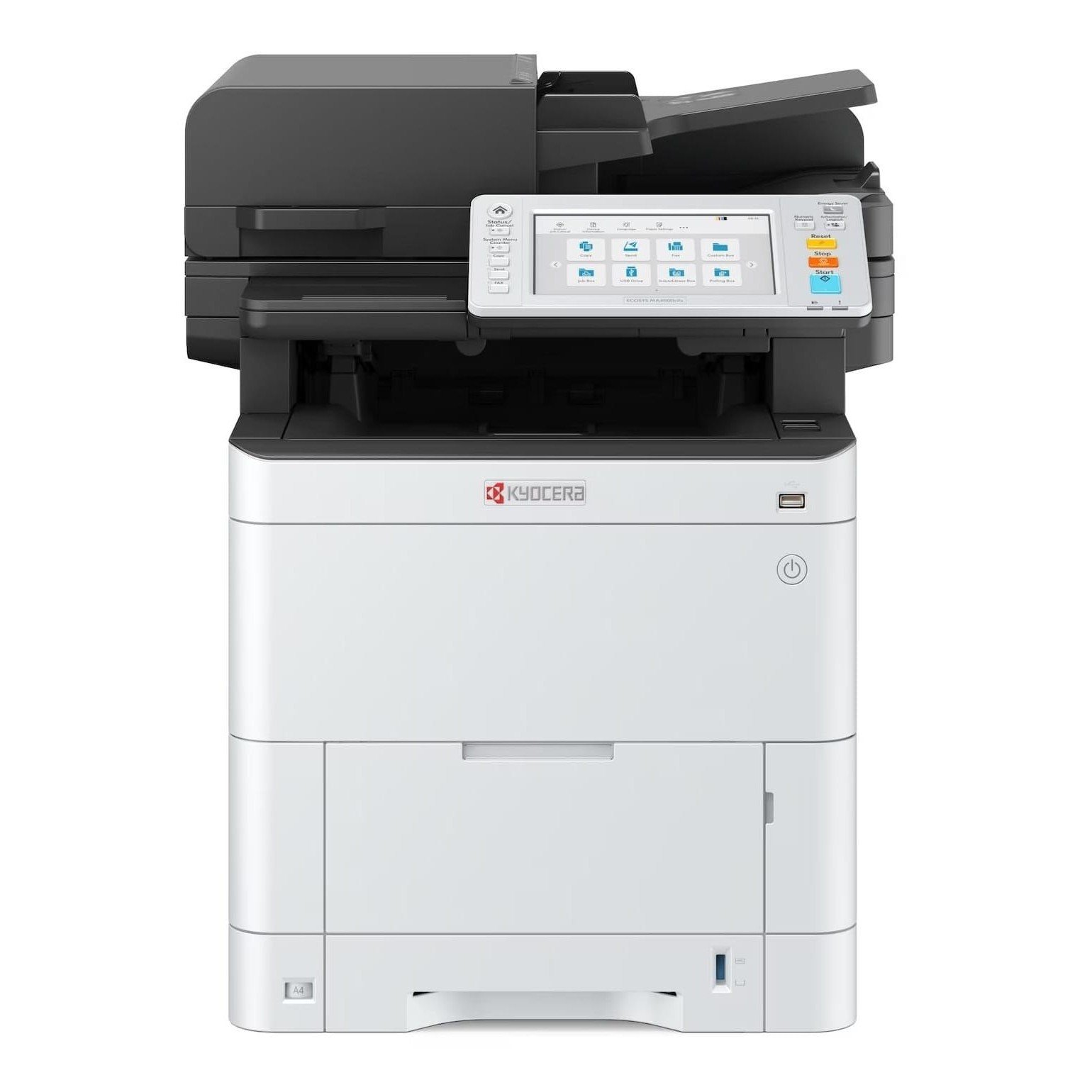
Best Business Printers in Kenya: Kyocera vs HP for Offices and Businesses
Choosing the right business printers in Kenya can make a significant difference to your business’s daily operations. Whether you run a small office, school, accounting firm, corporate department or busy business center, you need a printer that handles your workload reliably without making printing unnecessarily expensive.
But which are the best business printers in Kenya? Should you choose a Kyocera multi function printer or an HP printer? And what should you consider before investing in office printing equipment?
The right choice depends on how many pages you print, whether you need color or black-and-white output, the paper sizes you use and whether your employees need printing, scanning and copying from one machine.
At FGEE, businesses can explore office printing solutions from established brands, including Kyocera and HP. This guide compares selected models and explains what to consider before choosing a printer for your organization.
What should you look for when buying a business printer in Kenya?
Before choosing a printer, consider how your business actually uses printed documents. A machine that works well for a small office may struggle in a department handling hundreds of pages every day.
Here are six important factors to consider.
1. Monthly printing volume
Estimate how many pages your business prints in a typical month. Consider invoices, reports, contracts, customer records, school documents and other frequently printed materials.
A low-volume office may not need a large departmental printer. However, a busy organization should consider equipment designed for heavier workloads.
Ask the supplier about the recommended monthly print volume and maximum duty cycle. These figures are not interchangeable: a printer’s maximum duty cycle should not be treated as its recommended everyday workload.
2. Color or black-and-white printing
Do you regularly print colored reports, charts, presentations and marketing documents, or are most of your documents text-based?
A monochrome printer is suitable for businesses that mainly print black-and-white documents. A color printer is more appropriate when color output is part of everyday operations.
For example, an accounting office that mainly prints statements may priorities monochrome printing, while a marketing department may need color output.
3. Printing speed
Printer speed is usually measured in pages per minute (ppm). A faster printer can reduce waiting time when several employees share one machine.
However, do not choose a printer based on speed alone. Check whether the quoted speed applies to black-and-white or color printing, the paper size being used and the conditions under which the manufacturer measured it.
4. Multi function capabilities
A multi function printer combines several tasks, commonly printing, scanning and copying. Some models also support faxing.
This can help businesses reduce the number of separate machines they need. It is especially useful for offices that regularly scan contracts, copy identification documents or send digital versions of paperwork.
5. Paper sizes and handling
Standard A4 printing is sufficient for many businesses. However, organizations that prepare larger reports, drawings, plans, posters or presentation materials may need A3 support.
Check the supported paper sizes, input tray capacity, optional paper trays and automatic document feeder before buying.
6. Running and maintenance costs
The purchase price is only one part of the cost of owning a printer.
Also consider toner or ink prices, replacement components, servicing, electricity consumption, paper usage and the availability of supplies in Kenya.
A printer with a higher initial price may offer better long-term value if its running costs suit your workload.
Kyocera vs HP: Which business printer should you choose?
Kyocera and HP offer different office printing options. The best brand for your organization depends on the particular model and the work you expect it to handle.
Rather than choosing based on brand name alone, compare the specifications, consumables, support and total cost of ownership.
1. Kyocera ECOSYS M8124cidn
The Kyocera ECOSYS M8124cidn is an A3 color multi function printer designed for office environments that need printing, copying and scanning.
It is worth considering for organizations that regularly produce color documents and need support for larger paper formats.
Why consider it?
- Color printing, copying and scanning.
- A3 paper support.
- Suitable for offices handling a mixture of color and black-and-white documents.
- Designed as a multi function office machine.
Who should consider it?
Businesses that produce color reports, presentations, internal documents and larger-format office materials may find this model worth evaluating.
Before purchasing, confirm the available configuration, included accessories, warranty and local service arrangements.
2. Kyocera ECOSYS M4125idn
The Kyocera ECOSYS M4125idn is an A3 monochrome multi function printer. It is designed for organizations that need black-and-white printing, copying and scanning.
Kyocera lists a print speed of up to 25 pages per minute for A4 monochrome printing. The model also supports A3 paper, making it useful for businesses that handle larger documents.
Why consider it?
- Black-and-white multi function printing.
- A3 and A4 paper support.
- Up to 25 pages per minute for A4 monochrome printing.
- Suitable for shared office printing environments.
Who should consider it?
Accounting departments, administrative offices, schools and businesses that print large volumes of text-based documents may want to consider this model.
If your organization rarely needs color printing, a monochrome machine may be a more practical choice than paying for color capabilities you do not use.
3. HP M4303fdw
The HP M4303fdw is among the HP printer models in FGEE’s supplied product range.
When considering this model, ask for its complete specification sheet and confirm its printing, scanning, copying and connectivity capabilities. Also check whether the supplied configuration includes the functions your office requires.
It may be worth comparing against the Kyocera multi function options if your business is evaluating different office printing solutions.
4. HP M4303fdn
The HP M4303fdn is another model in the supplied HP M4303 range.
Before choosing it, compare its supported functions, network connectivity, duplex printing, print speed and consumable costs against the other available options.
Do not assume that two printers from the same product family have identical features. Check the exact model number before ordering.
5. HP M4303dw
The HP M4303dw completes the HP printer selection in FGEE’s product list.
Businesses comparing this model with the fdw and fdn versions should request a model-by-model specification comparison. Pay particular attention to wireless and wired connectivity, automatic two-sided printing, scanning and copying capabilities, and the functions included in each configuration.
The most suitable option is the one that meets your office’s actual requirements without making you pay for features you will not use.
Kyocera vs HP business printers: Quick comparison
| Printer model | Main consideration | Best suited to |
|---|---|---|
| Kyocera ECOSYS M8124cidn | A3 color multi function printing | Offices needing color and larger-format documents |
| Kyocera ECOSYS M4125idn | A3 monochrome multi function printing | Offices mainly printing black-and-white documents |
| HP M4303fdw | Confirm exact functions and configuration | Businesses comparing HP office printing options |
| HP M4303fdn | Confirm exact functions and configuration | Businesses comparing HP office printing options |
| HP M4303dw | Confirm exact functions and configuration | Businesses comparing HP office printing options |
Important: The HP models should be compared using their official specification sheets. Confirm their exact functions, print technology, speed, paper handling and consumables before making a purchase decision.
Laser printer vs ink tank printer: Which is better for a business?
One of the most common questions when buying a printer is whether to choose a laser printer or an ink tank printer.
The answer depends on the type of documents you print and how frequently you print them.
Laser printers use toner and are commonly chosen for text-heavy office printing. They can be suitable for organizations that regularly produce reports, invoices and business documents.
Ink tank printers use refillable ink reservoirs. They can be attractive for businesses that need economical color printing, especially when their workloads and print patterns suit the model.
Neither technology is automatically cheaper in every situation. Compare the printer’s purchase price, cost per page, ink or toner availability, maintenance requirements and expected print volume.
For a more detailed comparison, read FGEE’s guide to ink tank vs laser printers in Kenya.
Which business printer is best for your type of organization?
Different businesses have different printing needs. Here are some practical considerations.
Small and medium-sized offices
A small or medium-sized office should priorities reliability, reasonable running costs and the features employees use every day.
Consider how many people will share the printer and whether you need color, scanning and copying.
Schools and educational institutions
Schools regularly print examinations, assignments, learning materials, reports and administrative documents.
A suitable printer should match the institution’s printing volume and paper requirements. Larger institutions may benefit from a shared office multi function printer.
Accounting and professional services firms
Accounting firms, law offices and other professional service providers often print contracts, statements, invoices and reports.
A dependable monochrome multi function printer may be appropriate where most documents are text-based. Secure printing and document scanning can also be important considerations.
Cybercafe cafés and printing businesses
A cybercafe cafe needs equipment that can handle frequent customer jobs, different document types and a variety of printing requirements.
Before buying, consider expected daily volume, color demand, paper sizes, speed and the availability of replacement supplies.
For more specific advice, read how to choose a printer for a cybercafe cafe in Kenya.
How can you reduce business printing costs?
Buying a suitable printer is only the first step. How you use and maintain it also affects the total cost of ownership.
Here are practical ways to control printing expenses:
- Use duplex printing: Print on both sides of the paper where appropriate to reduce paper consumption.
- Choose the right print settings: Use draft or economy settings for internal documents when print quality requirements allow.
- Monitor printing activity: Track usage across departments to identify unnecessary printing.
- Use suitable consumables: Follow the manufacturer’s recommendations and check toner or ink compatibility.
- Maintain the printer: Clean and service the equipment according to the manufacturer’s instructions.
- Digitize documents where possible: Store and share documents electronically instead of printing every copy.
Regular maintenance can also help prevent avoidable breakdowns. Read how to maintain your printer for long-term use for practical maintenance advice.

Where can you buy business printers in Kenya?
Choosing an office printer should involve more than comparing the purchase prices of different models. You should also consider whether the supplier can help you identify the right configuration, explain consumable requirements and advise on servicing and warranty arrangements.
FGEE provides businesses with access to office technology solutions, including Kyocera and HP printer options.
Whether you need a color multi function printer, a monochrome office machine or an HP printer for your workplace, contact FGEE to discuss your printing requirements and check the availability of the models you are considering.
Before making your order, ask for:
- The complete manufacturer specification sheet.
- Current price and stock availability.
- Warranty details and service arrangements.
- Toner or ink costs and availability.
- Installation and network setup options.
- Recommended monthly print volume.
Visit FGEE to explore its technology solutions and esquire about available business printers in Kenya.
Frequently Asked Questions About Business Printers in Kenya
1. Which is the best business printer in Kenya?
There is no single best printer for every business. The right choice depends on printing volume, color requirements, paper sizes, multi function needs and running costs. The Kyocera ECOSYS M8124cidn is worth considering for A3 color multi function printing, while the M4125idn is an option for A3 monochrome printing.
2. Is Kyocera better than HP for office printing?
Neither brand is automatically better for every office. Compare the exact printer models, print speed, consumable costs, maintenance requirements, warranty and available support before choosing.
3. Which printer is suitable for high-volume office printing?
A suitable high-volume printer should have a recommended monthly print volume that matches your workload, adequate paper capacity, suitable print speed and readily available consumables. Ask the supplier to confirm these specifications before buying.
4. Should a business buy a color or monochrome printer?
Choose a color printer if your business regularly prints colored reports, presentations, charts or marketing materials. A monochrome printer may be more practical if most of your documents contain black text.
5. Are multi function printers worth buying for businesses?
Yes, when a business regularly prints, scans and copies documents. A multi function printer combines several tasks in one machine and can reduce the need for separate office equipment.
6. Is a laser printer better than an ink tank printer for business?
Laser printers are often suitable for text-heavy office workloads, while ink tank printers can be attractive for businesses with regular color printing needs. Compare the total cost of ownership and the manufacturer’s specifications rather than relying on printer type alone.
7. What should I check before buying an office printer?
Check the printer’s print technology, speed, recommended monthly volume, supported paper sizes, duplex capabilities, connectivity, consumable costs, warranty and local servicing options.
Final Thoughts On Business Printers In Kenya
The best business printers in Kenya are not necessarily the most expensive or fastest models. They are the machines that match your organization’s workload, document requirements and operating budget.
Kyocera ECOSYS M8124cidn and M4125idn provide different options for offices that need A3 color or monochrome multi function printing. HP’s M4303 models are also worth comparing once their exact specifications and configurations have been confirmed.
If your organization is planning to upgrade its office printing equipment, contact FGEE to esquire about available Kyocera and HP printers and get guidance on choosing a solution that fits your business.
Comments (0)