
Dell Latitude 7420 8GB vs 16GB RAM in Kenya: Which Configuration Should You Buy?
Choosing between the Dell Latitude 7420 8GB vs 16GB RAM configurations can make a difference in your everyday computing experience. Both options feature an 11th Generation Intel Core i5 processor and 256GB SSD storage, but their memory capacities determine how comfortably they handle multitasking and demanding applications.
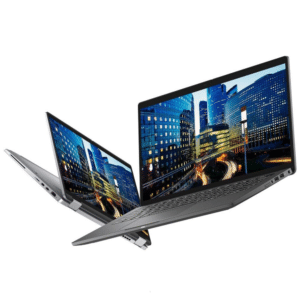
The Dell Latitude 7420 is part of Dell’s business laptop range, designed for professionals who need a portable computer for office work, communication and everyday productivity. With two memory configurations available through FGEE’s product listings, buyers can consider whether the lower-memory option meets their needs or whether investing in 16GB RAM is the better long-term decision.
In this guide, we’ll compare the two Dell Latitude 7420 configurations, explain how 8GB and 16GB RAM affect performance, and help you choose the right laptop for your work, studies or business in Kenya.
1. Dell Latitude 7420 8GB RAM: An Option for Everyday Computing
The Dell Latitude 7420 with 8GB RAM is suitable for users whose daily activities mainly involve basic office applications and general computing.
The configuration supplied by FGEE includes:
- 11th Generation Intel Core i5 processor
- 8GB RAM
- 256GB SSD storage
For everyday activities, this configuration provides a practical starting point.
What can you do with 8GB RAM?
An 8GB RAM laptop can handle several common computing activities, including:
- Preparing documents using Microsoft Word.
- Working with spreadsheets.
- Browsing websites.
- Attending online meetings.
- Sending and receiving emails.
- Using basic business applications.
However, performance may become less comfortable when you keep many browser tabs open while running several applications simultaneously.
For example, someone working with large spreadsheets, multiple browser tabs, video meetings and other office applications may experience more memory pressure.
Who should buy the 8GB configuration?
Consider the 8GB Dell Latitude 7420 if you:
- Mainly use Microsoft Office applications.
- Browse the internet for everyday tasks.
- Handle basic administrative work.
- Attend occasional online meetings.
- Have a limited laptop purchasing budget.
For users with relatively light computing requirements, 8GB RAM can still serve everyday needs.
2. Dell Latitude 7420 16GB RAM: More Room for Multitasking
The 16GB RAM configuration offers additional memory capacity for users who regularly work with multiple applications.
It comes with:
- 11th Generation Intel Core i5 processor
- 16GB RAM
- 256GB SSD storage
The main advantage over the 8GB configuration is the additional system memory.
When running multiple applications, your computer needs enough RAM to keep active programs and their data readily accessible. Having 16GB gives the system more room to handle these workloads without relying as heavily on slower storage-based memory management.
What can you do with 16GB RAM?
The 16GB configuration is suitable for activities such as:
- Running multiple browser tabs.
- Working with larger Excel spreadsheets.
- Attending video meetings while using other applications.
- Managing business software.
- Working with several office applications simultaneously.
- Handling more demanding everyday productivity workloads.
It is particularly useful for professionals who frequently switch between different applications throughout the working day.
Who should buy the 16GB configuration?
Consider the 16GB Dell Latitude 7420 if you:
- Work with multiple applications simultaneously.
- Handle spreadsheets and business reports.
- Regularly attend online meetings.
- Use several browser tabs throughout the day.
- Want more memory capacity for future software requirements.
For users who multitask regularly, 16GB RAM is generally the more comfortable choice.
3. Dell Latitude 7420 8GB vs 16GB RAM: Specifications Comparison
The two configurations share the same processor generation and storage capacity. Their primary difference is the amount of installed memory.
| Specification | 8GB configuration | 16GB configuration |
|---|---|---|
| Laptop model | Dell Latitude 7420 | Dell Latitude 7420 |
| Processor | Intel Core i5, 11th Gen | Intel Core i5, 11th Gen |
| RAM | 8GB | 16GB |
| Storage | 256GB SSD | 256GB SSD |
| Graphics | Integrated Intel graphics | Integrated Intel graphics |
| Intended use | Everyday computing | Multitasking and productivity |
What is the biggest difference?
The 16GB configuration provides twice the memory capacity of the 8GB version.
This does not mean that every application will run twice as fast. Processor performance, software requirements, storage and workload also influence the overall experience.
However, when your daily activities require more memory, the 16GB configuration can provide a smoother multitasking experience.
4. Is 8GB RAM Enough, or Should You Choose 16GB?
Your choice should depend on how you intend to use the laptop.
For students
If you mainly prepare assignments, browse the internet, attend online classes and use Microsoft Office, 8GB RAM may be sufficient.
However, students who regularly use several applications simultaneously may benefit from 16GB.
For office professionals
Office workers often switch between spreadsheets, documents, emails, online meetings and business applications.
For this type of workload, 16GB RAM provides more room for multitasking.
For business owners
Business owners may use accounting software, inventory systems, communication platforms and browser-based applications throughout the day.
The 16GB configuration is worth considering if you regularly run several of these applications together.
For remote workers
Remote work often involves video conferencing, browser-based tools, document editing and communication applications.
If these activities happen simultaneously, 16GB RAM is the more comfortable option.
5. Does the Dell Latitude 7420 Allow RAM Upgrades?
This is an important consideration before purchasing either configuration.
The Dell Latitude 7420 uses integrated memory on the system board rather than conventional removable RAM modules. This means the installed memory is not normally upgrade able after purchase.
Consequently, choosing between 8GB and 16GB should be a decision made before buying the laptop.
If you expect your software requirements to increase over time, purchasing the 16GB configuration from the beginning is worth considering.
Always confirm the precise hardware configuration before ordering.
6. What Else Should You Consider Before Buying a Dell Latitude 7420?
RAM is important, but it should not be the only factor influencing your purchase.
Here are other features worth checking.
Processor
Both configurations supplied by FGEE are listed with an 11th Generation Intel Core i5 processor.
Ask for the exact processor model because different Core i5 variants can have different clock speeds and features.
SSD storage
Both configurations feature a 256GB SSD.
An SSD provides faster access to files and applications compared with traditional mechanical hard drives. However, consider your storage requirements if you work with large files.
Display and touchscreen
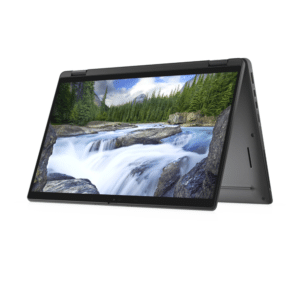
If you are purchasing the 2-in-1 version, confirm that the particular unit has the touchscreen display and convertible hinge functionality you expect.
Not every Dell Latitude 7420 configuration has identical display features.
Battery condition
For previously used or refurbished laptops, ask about battery health and how long the laptop can operate away from a power source.
Warranty and condition
Confirm whether the laptop is brand new, refurbished or previously used. Also check the warranty, physical condition and after-sales support.
For more guidance, read our article on things to check before buying a laptop in Kenya.
7. Where Can You Buy the Dell Latitude 7420 in Kenya?
If you’re looking for a Dell business laptop in Kenya, FGEE offers different laptop configurations to suit different computing requirements.
You can explore the available Dell laptops at FGEE and compare their specifications before making a purchase.
You can also view the individual Dell Latitude 7420 listings:
Confirm current availability, exact specifications and pricing with FGEE before ordering.
8. Frequently Asked Questions
Is 8GB RAM enough for the Dell Latitude 7420?
Yes. The 8GB configuration can handle everyday activities such as document editing, browsing, email and basic office applications. However, users who frequently multitask may benefit from 16GB.
Is 16GB RAM better than 8GB for office work?
For users who work with multiple applications, browser tabs, spreadsheets and online meetings, 16GB RAM provides more memory capacity and generally offers a more comfortable multitasking experience.
Can I upgrade the Dell Latitude 7420 from 8GB to 16GB RAM?
The Latitude 7420 uses onboard memory, which is integrated into the system board. The RAM is not designed for a conventional user upgrade, so choose the required memory capacity before purchasing.
Does the Dell Latitude 7420 have an SSD?
Yes. The FGEE configurations discussed in this article feature 256GB SSD storage.
Is the Dell Latitude 7420 suitable for business use?
Yes. The Latitude series is designed for business and professional computing. It is suitable for common office activities, communication, document preparation and everyday productivity.
Should I buy a Dell Latitude 7420 with 8GB or 16GB RAM?
If your activities mainly involve basic office applications and browsing, 8GB may be sufficient. If you regularly multitask or want more memory capacity for demanding applications, choose 16GB.
Conclusion: Is the Dell Latitude 7420 16GB Worth Choosing?
The Dell Latitude 7420 8GB and 16GB configurations offer different memory capacities for different computing requirements.
The 8GB version is a reasonable option for everyday computing, while the 16GB version is better suited to professionals, students and business users who regularly work with multiple applications.
If your budget allows and you expect to use the laptop for several years, the 16GB configuration is the option worth prioritizing, particularly because the memory is integrated and cannot normally be upgraded later.
Looking for a business laptop in Kenya? Explore our comprehensive guide to business laptops in Kenya to compare different models and find a laptop that matches your productivity needs.
Visit FGEE to explore available Dell laptops and get assistance choosing the right configuration for your work.



Comments (0)