
CS03XL Laptop Battery for HP EliteBook 840 G3, 848 G3, 850 G3, 755 G3, 745 G3, 840 G4, 848 G4, 850 G4, 755 G4, 745 G4
The CS03XL Laptop Battery is one of the most versatile and essential power components for HP’s premium business line. Specifically engineered for the EliteBook 700 and 800 G3/G4 series, this battery is designed to provide the endurance and safety required for corporate environments.
Retailing in Kenya for approximately KSh 4,000 to KSh 5,000, it is a high-value investment for users experiencing power issues like “plugged in, not charging” or rapid battery drain.
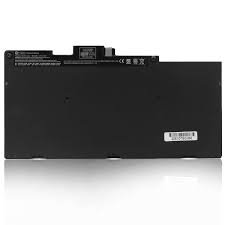
1. Technical Specifications
Whether you are buying a genuine OEM or a high-quality replacement, these are the standard technical benchmarks for the CS03XL:
| Feature | Specification |
|---|---|
| Battery Type | Lithium-ion Polymer (Li-Po) |
| Voltage | 11.4V (Standard) / 14.4V (Extended) |
| Capacity | 46Wh (approx. 4000mAh – 4100mAh) |
| Cell Count | 3-Cell Configuration |
| Part Numbers | CS03XL, HSTNN-IB6Y, 800049-001, T7B32AA |
2. Extensive Compatibility List
The CS03XL is a multi-fit battery, meaning it works across several generations and sizes of HP hardware. It is the correct replacement for the following models:
- HP EliteBook 840 Series: G3, G4
- HP EliteBook 850 Series: G3, G4
- HP EliteBook 745 Series: G3, G4
- HP EliteBook 755 Series: G3, G4
- HP EliteBook 848 Series: G3, G4
- HP ZBook Workstations: 15u G3, 15u G4
- HP Thin Clients: mt42, mt43
3. When Should You Replace Your CS03XL?
Because these batteries are internal (built into the chassis), you should look for the following warning signs:
- Chassis Swelling: If your laptop’s trackpad is sticking or the bottom cover is bulging, the battery may be swollen and must be replaced immediately to avoid motherboard damage.
- Sudden Shutdowns: If the laptop turns off instantly when the charger is unplugged — even if the indicator shows 50%.
- HP Battery Alert (601 Error): On startup, your laptop may display a black screen with a “601” error code, indicating the primary battery has reached its capacity limit.
4. Maintenance Tips for Longevity
To get the most out of your new CS03XL battery (typically 500–800 charge cycles), follow these best practices:
- Initial Calibration: Charge the new battery to 100% and continue charging for at least 2 additional hours. Then discharge it to about 10% before charging it back to full.
- Avoid Deep Discharge: Try not to let your battery hit 0% frequently. Lithium-polymer batteries last longer when kept between 20% and 80%.
- Heat Management: Ensure the laptop’s vents are clear. Heat is the primary enemy of battery chemistry and can lead to premature swelling.
Leave a comment