
Dell 19.5v 4.62A Big pin Laptop charger-generic
When your original Dell charger fails, finding a compatible replacement is critical to keep your laptop running. The Dell 19.5V 4.62A 90W “Big Pin” charger is one of the most common power adapters in the market, used by a vast range of Dell business and consumer laptops.
A generic (replacement) version offers a budget-friendly alternative to the expensive OEM (Original Equipment Manufacturer) units, typically retailing in Kenya for between KSh 1,000 and KSh 1,500.
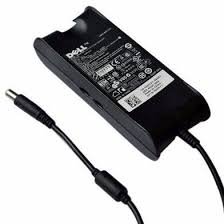
1. Key Technical Specifications
Before purchasing a generic charger, verify that the following specs match your laptop’s requirements (usually found on a sticker at the bottom of the laptop):
2. Broad Compatibility
The “Big Pin” connector was the standard for Dell for over a decade. This charger is compatible with:
- Dell Latitude Series: E6410, E6420, E6430, E6440, E6540, E5440, E5470, E7440, E7450.
- Dell Inspiron Series: 15 (3000, 5000, 7000 series), N5010, N5110, 1545.
- Dell Vostro Series: 3460, 3560, 3750.
- Dell Precision: M2800, M4600, M4700 (standard workstations).
3. Why Choose a Generic Charger?
-
Cost-Effective: Generic chargers are significantly cheaper (often 1/3 of the price) than genuine Dell adapters.
-
Availability: They are widely available in local computer shops like those at Revlon Plaza or Kimathi Street in Nairobi.
-
Emergency Backup: They serve as an excellent secondary charger to keep at the office or in your travel bag.
4. Safety and Risk Factors
While generic chargers are functional, they differ from original ones in a few ways:
-
Heat Management: Generic units may run slightly hotter during heavy use. Ensure the “brick” is placed in a well-ventilated area.
-
Cable Durability: The “strain relief” (where the wire meets the plug) is often less reinforced than original units. Avoid wrapping the cable too tightly.
-
The “AC Adapter Not Recognized” Error: Occasionally, a low-quality generic charger might trigger a warning on your Dell screen. This is because the center pin fails to communicate with the laptop’s BIOS. If this happens, the laptop may run but won’t charge the battery.
Not sure if this is the right pin ? Check the official Dell power compatibility here.
Leave a comment